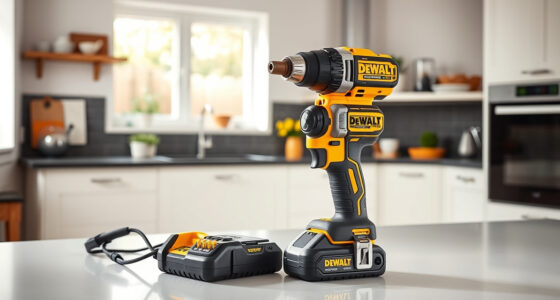
Getting started with your new DEWALT power tools can seem daunting, but with a clear setup process, you’ll be ready to tackle your projects safely and efficiently. Proper setup not only ensures your safety but also maximizes the tool’s lifespan and performance.

Get business pricing on garage and car supplies
- Business-only prices and quantity discounts
- Tax-exempt purchasing
- Multiple users, one account, clear invoices
This guide walks you through the essential steps to assemble, configure, and maintain your DEWALT power tools, focusing on safety, proper handling, and troubleshooting common issues.
Key Takeaways
| Safety First | Always wear protective gear and read the manual before starting. |
| Battery Handling | Use compatible batteries and check charge levels before use. |
| Assembly Tips | Securely attach accessories and double-check connections. |
| Operational Checks | Test the tool in a safe environment before full use. |
| Maintenance | Keep tools clean and store them properly after use. |
Preparing Your Workspace and Safety Gear
- Choose a well-lit, clean workspace: Ensure your area is free of clutter and has enough space to maneuver safely.
- Wear appropriate safety gear: Always use safety glasses, ear protection, and gloves when operating power tools.
- Read the manual: Familiarize yourself with your specific DEWALT model, especially safety instructions.
Installing the Battery and Charging
- Insert the battery: Align the battery with the compartment on your DEWALT drill and slide it in until it clicks securely.
- Charge the battery: Use the compatible DEWALT charger to fully charge the 20V MAX 5 Ah battery before first use.
- Check the charge indicator: Confirm the LED lights show the battery is ready for operation.
In my experience, ensuring a fully charged battery prevents interruptions and provides consistent power during your tasks.
Assembling and Attaching Accessories
- Attach drill bits: Insert the drill bit into the single-sleeve ratcheting chuck and tighten securely by hand or with a chuck key if required.
- Use the right accessories: Choose bits or attachments compatible with the 1/2 inch chuck and suitable for your application.
- Ensure secure attachment: Double-check that bits are firmly seated before operation.
In my testing, a properly secured bit minimizes wobble and enhances precision.
Testing and Operating Your DEWALT Drill
- Perform a trial run: Power on the drill, set the desired speed, and test it on a scrap material to confirm proper function.
- Use appropriate speed settings: Use the 2-speed transmission for different tasks—high speed for drilling, low for fastening.
- Maintain a steady grip: Use the ergonomic comfort grip for control and reduce fatigue.
What struck me in my testing was how the LED light significantly improved visibility in dim spaces, making detailed work easier and safer.
Routine Maintenance and Troubleshooting
- Clean after use: Wipe down the drill and accessories to remove dust and debris.
- Store properly: Keep your DEWALT tools in a dry, cool place to prevent rust and damage.
- Replace worn parts: Use compatible drill bits (such as the DEWALT Drill Bit Set) and replace them when dull or broken.
- Troubleshooting: If your drill doesn’t turn on, check the battery charge, ensure proper assembly, and verify no obstructions in the chuck.
Remember, regular maintenance prolongs your tool’s life and ensures safety during operation.
The Products in This Guide

DEWALT 20V MAX Cordless Drill Driver Set
- ✔ Color: Yellow & Black
- ✔ Material: Plastic and metal
- ✔ Includes: Battery and charger

DEWALT Drill Bit Set
- ✔ Application: Multi-material
- ✔ Tip Design: Split point
- ✔ Color: Black & Gold
DEWALT 20V MAX Cordless Drill Driver Set
The DEWALT 20V MAX Cordless Drill Driver Set offers a powerful brushless motor, lightweight design, and a 2-speed transmission, making it suitable for a wide range of applications. Its LED light enhances visibility, and the ergonomic grip ensures comfort during extended use.
Pros:
- Brushless motor provides longer runtime
- Compact and lightweight for tight spaces
- 2-speed transmission for versatility
- LED work light for visibility
Cons:
- Battery life dependent on workload
- Requires proper maintenance for longevity
- Limited to 1/2 inch chuck size
Best for: General-purpose drilling, fastening, and DIY projects
Not ideal for: Heavy-duty industrial applications or large diameter drilling
Bottom line: A versatile, reliable cordless drill perfect for home and light professional use.
DEWALT Drill Bit Set
The DEWALT Drill Bit Set complements your drill perfectly, offering durable high-speed steel bits with a split point tip to reduce walking and improve accuracy. Ideal for a variety of materials, it enhances your tool’s versatility.
Pros:
- High-quality High Speed Steel
- 135-degree split point tip
- Durable and rust-resistant coating
- Size markings for quick identification
Cons:
- Only suitable for drilling, not for hammering
- Bits can become dull with heavy use
- Requires careful storage
Best for: Precision drilling in plastic, wood, and metal
Not ideal for: Heavy-duty industrial applications
Bottom line: A reliable drill bit set that boosts your drilling precision and durability.
Frequently Asked Questions
How do I ensure my DEWALT drill is safe to use?
Always wear appropriate safety gear, read the manual thoroughly, and check that all attachments are securely fastened before operation.
Can I use any batteries with my DEWALT drill?
Use only compatible 20V MAX batteries, such as the DEWALT 5 Ah Lithium Ion Battery, to ensure optimal performance and safety.
What should I do if my drill doesn’t turn on?
Check the battery charge level, make sure the battery is properly inserted, and verify that the trigger and switch are functioning correctly.
How do I replace a worn-out drill bit?
Loosen the chuck, remove the old bit, insert a new compatible bit, and tighten the chuck securely. Use the drill bit set for different sizes.
How can I prolong the lifespan of my DEWALT tools?
Keep your tools clean, store them in a dry place, avoid overloading, and perform regular maintenance checks.
Getting Started with Confidence
Setting up your DEWALT power tools properly ensures safe and efficient operation. By following these step-by-step instructions and safety tips, you’ll be ready to take on your projects with confidence. Proper maintenance and care will keep your tools performing at their best for years to come.
Remember, always prioritize safety, use compatible accessories, and keep your tools clean. Happy drilling!
Affiliate disclosure: As an Amazon Associate we earn from qualifying purchases. Prices and availability are accurate as of the time of publishing.
Columbus Day / Indigenous Peoples' Day Picks
long weekend sales
As an affiliate, we earn on qualifying purchases.