
Automotive diagnostic scan tools range from basic check-engine-code readers to advanced scanners that access multiple vehicle systems and run active tests. I rank the Autel MaxiCOM MK808S as the best overall for its broad system diagnosis, bidirectional controls, and extensive service functions. The FOXWELL NT301 is a simpler choice for check-engine troubleshooting, while the TOPDON ONE stands out for buyers who want a large touchscreen and advanced capabilities. The main tradeoff is how much diagnostic depth you need versus how much complexity you are willing to manage. Read on for the full comparison and help matching a scanner to your vehicle and repair plans.

Get business pricing on garage and car supplies
- Business-only prices and quantity discounts
- Tax-exempt purchasing
- Multiple users, one account, clear invoices
Complete the kit


Key Takeaways
- The MK808S leads as an all-rounder because its full-system coverage and bidirectional tests reach well beyond basic engine-code reading.
- Scanner capability varies more by diagnostic depth than by code reading. The NT301 and AD310 focus on OBD-II tasks, while several higher-tier picks add broader system access and service functions.
- Bidirectional control is a meaningful dividing line. It can let a user command supported components during diagnosis, but vehicle compatibility and test availability still vary.
- The FOXWELL NT604 Elite fills a targeted middle ground for shoppers focused on ABS, SRS, and transmission diagnostics rather than the broadest service menus.
- Large screens and wireless features are not substitutes for fit. Buyers should check vehicle coverage and the functions they need before paying for a more elaborate scanner.
| Autel MaxiCOM MK808S Diagnostic Scanner |  | Best for Broad Workshop Coverage | Display: 7-inch | Processor: RK3566 | Memory: 4 GB RAM | VIEW LATEST PRICE | See Our Full Breakdown |
| FOXWELL NT301 OBD2 Scanner |  | Best for Check-Engine Troubleshooting | Model: NT301 | Weight: 0.16 kg | Supported protocols: CAN, ISO9141, KWP2000, J1850 | VIEW LATEST PRICE | See Our Full Breakdown |
| ANCEL AD310 Classic Enhanced Universal OBD II Scanner | 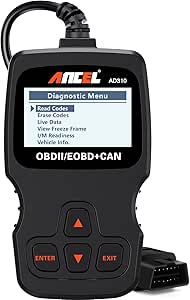 | Best Simple Code Reader | Weight: 12 ounces | Dimensions: 8.9 × 6.9 × 1.4 inches | Cable length: 2.5 feet | VIEW LATEST PRICE | See Our Full Breakdown |
| TOPDON ONE Bidirectional Automotive Diagnostic Scan Tool |  | Best Premium, Newer-Vehicle Platform | Screen: 10.1-inch touchscreen | Weight: 3.5 pounds | Communication protocols: J2534, CAN-FD, DoIP | VIEW LATEST PRICE | See Our Full Breakdown |
| THINKCAR 673BT Bidirectional OBD2 Scanner |  | Best Wireless Full-System Value | Display: 7-inch touchscreen, 1024 × 600 | Operating system: Android 10 | Processor: Quad-core, 2.0 GHz | VIEW LATEST PRICE | See Our Full Breakdown |
| Autel MaxiCOM MK900BT Bidirectional Diagnostic Scanner |  | Best for Broad Shop-Level Coverage | Display: 8 inches | Active tests: More than 3,000 | Service functions: More than 40 | VIEW LATEST PRICE | See Our Full Breakdown |
| Innova 5610 OBD2 Bidirectional Scan Tool |  | Best for Guided DIY Diagnostics | Model: 5610 | Weight: 1.3 pounds | Vehicle compatibility: Most 1996–2023 OBD2 vehicles; coverage varies | VIEW LATEST PRICE | See Our Full Breakdown |
| FOXWELL NT604 Elite OBD2 Car Scanner – ABS, SRS & Transmission Diagnostics |  | Best for Straightforward Multi-System Code Checks | Screen: 4.3-inch color display | Native resolution: 480 × 272 | Operating system: Linux | VIEW LATEST PRICE | See Our Full Breakdown |
| BLCKTEC 460T OBD2 Scanner with All-System Diagnostics and 12+ Reset Functions |  | Best for Lifetime Updates and Data Logging | Diagnostic systems: Engine, transmission, ABS, SRS, and other vehicle ECUs | Service functions: More than 12 reset and service functions | Data features: Live and freeze-frame data, graphing, recording, replay | VIEW LATEST PRICE | See Our Full Breakdown |
| MUCAR 632 OBD2 Bidirectional Diagnostic Scanner with 15 Reset Services | 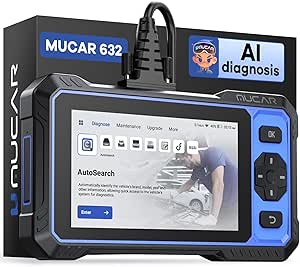 | Best for Touchscreen Features and ECU Coding | Display: 6.2-inch touchscreen, 1024 × 600 | Processor: 1.8 GHz | Operating system: Android 8.1 | VIEW LATEST PRICE | See Our Full Breakdown |
More Details on Our Top Picks
Autel MaxiCOM MK808S Diagnostic Scanner
The Autel MaxiCOM MK808S is the strongest fit here for buyers who need more than check-engine diagnostics. Its full-system coverage, 3,000+ active tests, and functions such as injector coding and battery-management resets give it a wider repair role than the FOXWELL NT301 or ANCEL AD310, which focus on OBD-II engine and emissions data. Gateway access for supported Renault, FCA, and VAG vehicles adds reach, while the 7-inch wired display avoids wireless link delays. That broader capability comes with tradeoffs: the tablet is less compact than a handheld reader, and software upgrades carry an annual fee. Vehicle coverage and special functions still need to be checked against the specific model. I’d choose it for varied repair work, not occasional warning-light checks.
Pros:- Full-system diagnostics and more than 3,000 active tests provide broader fault-finding options than basic OBD-II readers.
- Supports service functions including injector coding and BMS reset, subject to vehicle compatibility.
- Gateway access includes FCA SGW, Renault, and VAG SFD support.
- The wired 7-inch display avoids Bluetooth latency and gives more room to read diagnostic information.
Cons:- Annual software upgrades require an added subscription fee.
- Some functions and vehicle coverage must be verified by make, model, and year.
- The tablet form is less convenient to carry and handle in tight work areas than a handheld reader.
Best for: Independent repair shops and experienced DIY mechanics who need full-system scans, bidirectional tests, and service functions across a varied vehicle mix.
Not ideal for: Drivers who only need to read and clear engine codes, or buyers who want a compact handheld tool without recurring software-upgrade costs.
- Display:7-inch
- Processor:RK3566
- Memory:4 GB RAM
- Active tests:3,000+
- Service menus:28+
- Vehicle brands covered:200+
- Connectivity:Wired; no Bluetooth
- Supported languages:21
Our verdict“Choose the MK808S for broad, hands-on workshop diagnostics, but skip it if basic engine-code checks are all you need.”
FOXWELL NT301 OBD2 Scanner
The FOXWELL NT301 is a practical step up from a bare-bones code reader: it pairs code reading and clearing with live engine data, graphs, and a one-click I/M Readiness check. That makes it more useful than the ANCEL AD310 when you want to watch sensor behavior or check emissions readiness before an inspection, without moving to a full-system tablet such as the Autel MaxiCOM MK808S. It supports major OBD-II protocols and draws power from the vehicle, so there are no batteries to keep charged. Its boundary is clear, though: this is primarily an engine and emissions tool, not a scanner for broad module diagnostics or bidirectional control. Permanent trouble codes also cannot be erased directly, and some tests depend on the vehicle. I’d pick it for routine engine fault checks, not deeper repair work.
Pros:- Displays and graphs live engine sensor data to help track a fault beyond the stored code.
- One-click I/M Readiness makes it easier to check emissions-monitor status.
- Supports major OBD-II protocols used by most 1996-and-newer US-market cars, SUVs, and light trucks.
- Powered through the vehicle’s OBD-II port, so it needs no separate batteries.
Cons:- Focuses on engine-related OBD-II diagnostics rather than full-system scanning.
- Permanent DTCs cannot be cleared directly and may require the vehicle to complete drive cycles.
- EVAP and oxygen-sensor tests vary by vehicle and may not be available.
Best for: Car owners and home mechanics who want live engine data and emissions-readiness checks for most 1996-and-newer US-market vehicles.
Not ideal for: Technicians who need ABS, SRS, transmission, or other full-system diagnostics, or buyers seeking bidirectional tests and advanced service functions.
- Model:NT301
- Weight:0.16 kg
- Supported protocols:CAN, ISO9141, KWP2000, J1850
- Vehicle coverage:Most 1996-and-newer US-market cars, SUVs, and light trucks
- Live data:Real-time display and graphs
- Readiness check:One-click I/M Readiness
- Power:Powered by the vehicle’s OBD-II port
- Warranty:12 months
Our verdict“Choose the NT301 for affordable-to-use engine-data checks and readiness monitoring, not for diagnostics beyond the OBD-II engine system.”
ANCEL AD310 Classic Enhanced Universal OBD II Scanner
The ANCEL AD310 is the simplest choice in this group for reading and clearing emissions-related codes. It supports common OBD-II protocols and draws power through the vehicle connector, so setup is straightforward and there is no battery or charger to manage. Compared with the FOXWELL NT301, the AD310 has a more limited diagnostic role: the NT301 adds live-data graphs and a one-click readiness check, while this ANCEL is aimed at quick code lookups and basic emissions troubleshooting. Its compact, lightweight body and clearly labeled buttons suit occasional home-garage use, though the 2.5-foot cable can limit where the screen rests while connected. The main drawback is its narrow scope: it does not read non-emissions faults and will not work on older OBD-I vehicles. I’d choose it for basic checks, not expanding repair needs.
Pros:- Reads and clears emissions-related trouble codes with a simple button layout.
- Supports major OBD-II protocols for broad compatibility with listed vehicle groups.
- Draws power from the vehicle connector and needs no battery or charger.
- Lightweight handheld design is easy to store and carry.
Cons:- Does not read non-emissions faults or provide full-system diagnostics.
- Cannot diagnose older OBD-I vehicles, even with adapters.
- The 2.5-foot cable may restrict screen placement around the driver’s seat or engine bay.
Best for: Budget-conscious owners of OBD-II vehicles who want a straightforward handheld reader for emissions-related codes and basic troubleshooting.
Not ideal for: DIY mechanics who need live-data graphing, non-emissions module coverage, bidirectional controls, or diagnostics for OBD-I vehicles.
- Weight:12 ounces
- Dimensions:8.9 × 6.9 × 1.4 inches
- Cable length:2.5 feet
- Supported protocols:KWP2000, J1850 VPW, ISO9141, J1850 PWM, CAN
- Vehicle compatibility:1996 US, 2000 EU, and Asian cars, light trucks, and SUVs
- Diagnostic scope:Emission-related OBD-II codes
- Power:Powered through the vehicle connector
Our verdict“Pick the AD310 for occasional basic emissions-code checks; choose the FOXWELL NT301 if live data and readiness monitoring matter.”
TOPDON ONE Bidirectional Automotive Diagnostic Scan Tool
The TOPDON ONE is the most forward-looking platform in this batch for shops working with newer vehicle architectures. Support for CAN-FD, DoIP, and J2534 pass-through gives it a different emphasis from the Autel MaxiCOM MK808S and THINKCAR 673BT: this tool pairs bidirectional diagnostics and 50+ service functions with newer communication standards, topology mapping, and supported-brand ECU coding. Its 10.1-inch touchscreen gives more room for diagrams and guided procedures, including Volkswagen and Audi coverage, while the AI assistant can help interpret codes and wiring information. Those features are useful only when the vehicle is supported, however, and software access and newer data depend on an active subscription. At 3.5 pounds, it is also a larger tablet than the wireless THINKCAR. I’d favor it for advanced shop workflows, not simple owner code checks.
Pros:- Supports J2534 pass-through, CAN-FD, and DoIP for newer diagnostic and programming workflows.
- Bidirectional diagnostics and more than 50 service functions extend beyond basic code reading.
- Topology mapping and supported-brand ECU coding can help locate faults across vehicle systems.
- Large 10.1-inch touchscreen provides room for guided procedures and wiring information.
Cons:- Vehicle-specific functions and ECU coding vary by make and model.
- New vehicle data and ongoing hardware warranty coverage require an active subscription.
- Its 3.5-pound tablet is less portable than smaller handheld scanners.
Best for: Repair professionals who work on supported newer vehicles and need pass-through capability, topology mapping, guided procedures, and bidirectional tests.
Not ideal for: Casual owners who only need to read engine codes, or buyers unwilling to manage a software subscription for vehicle-specific features and newer data.
- Screen:10.1-inch touchscreen
- Weight:3.5 pounds
- Communication protocols:J2534, CAN-FD, DoIP
- Service functions:50+
- Connectivity:Dual Wi-Fi
- Functions:Bidirectional diagnostics, topology mapping, and supported-brand ECU coding
- Included components:ONE tablet, ONE VCI, OBDII extension cable, USB-C cables, power adapter, quick user guide
Our verdict“Choose the TOPDON ONE for supported newer-vehicle shop work and advanced protocols, but skip it for basic owner-level diagnostics.”
THINKCAR 673BT Bidirectional OBD2 Scanner
The THINKCAR 673BT brings full-system diagnostics and bidirectional control into a wireless tablet setup, making it a practical middle ground between the basic FOXWELL NT301 and the more specialized TOPDON ONE. Its Bluetooth 5.0 VCI lets the technician move around the vehicle while running supported tests, and CAN-FD and DoIP support add newer-vehicle protocol coverage. More than 28 maintenance services, Wi-Fi updates, and AutoVIN round out a broad feature set without the TOPDON’s listed J2534 pass-through and topology-mapping focus. The 7-inch screen is easier to handle than the TOPDON’s 10.1-inch display, but its smaller memory allocation and vehicle-dependent functions make it less suited to demanding shop workflows. AutoVIN may also fail on some vehicles. I’d choose it for wireless general repairs, after checking make-and-model coverage.
Pros:- Bidirectional control can run supported actuator tests rather than only display fault codes.
- Scans multiple vehicle systems and supports CAN-FD and DoIP.
- More than 28 maintenance and reset services cover common service tasks, subject to vehicle compatibility.
- Bluetooth diagnostics, Wi-Fi updates, and an included carrying case support mobile use.
Cons:- Available diagnostics and service functions vary by make and model.
- AutoVIN may not work on every vehicle.
- Its 2 GB RAM is less generous than the Autel MaxiCOM MK808S’s 4 GB, which may matter for heavier multitasking.
Best for: Home mechanics and small repair shops seeking wireless full-system scans, bidirectional tests, and maintenance resets across a range of supported vehicles.
Not ideal for: Technicians who need J2534 pass-through, topology mapping, or guaranteed access to every listed service on every vehicle.
- Display:7-inch touchscreen, 1024 × 600
- Operating system:Android 10
- Processor:Quad-core, 2.0 GHz
- Memory and storage:2 GB RAM, 64 GB ROM
- Battery:4150 mAh
- Connectivity:Bluetooth 5.0; 2.4 GHz and 5 GHz Wi-Fi
- Supported protocols:CAN FD and DoIP
- Vehicle coverage:1996 and newer; 96+ brands and 10,000+ models
- Maintenance services:28+; availability varies by make and model
Our verdict“Choose the 673BT for wireless full-system diagnostics and maintenance work, but verify vehicle coverage before relying on specific functions.”
Autel MaxiCOM MK900BT Bidirectional Diagnostic Scanner
The MK900BT is the strongest fit here for buyers who need broad system access across many makes, rather than a focused code reader. It pairs all-system diagnostics with 3,000+ active tests and more than 40 service functions, giving technicians more ways to investigate faults and operate vehicle systems than the FOXWELL NT604 Elite, which lacks bidirectional tests and several reset functions. Support for CAN FD and DoIP also helps it cover newer vehicle networks. AutoVIN and Wi-Fi report printing can speed up intake and documentation. The tradeoff is that advertised functions depend on vehicle support, battery testing needs a separate BT506, and included software updates last one year. I’d choose the BLCKTEC 460T for lifetime updates and a narrower feature set, but the MK900BT suits broader diagnostic work.
Pros:- Bidirectional control with more than 3,000 active tests
- Over 40 service functions across more than 150 makes
- Supports CAN FD and DoIP protocols
- AutoVIN and Wi-Fi printing support vehicle identification and scan reports
Cons:- Some functions depend on vehicle make, model, and system support
- Battery testing requires a separately purchased BT506
- Only one year of software updates is included
Best for: Independent repair shops and advanced DIYers who work across many makes and need bidirectional tests, service functions, and scan reports.
Not ideal for: Owners who only need to read engine codes or want battery testing included; the broad toolset may be unnecessary, and battery testing requires the separate BT506.
- Display:8 inches
- Active tests:More than 3,000
- Service functions:More than 40
- Supported makes:More than 150
- Vehicle years:1996–2026
- Protocols:CAN FD, DoIP
- Connectivity:Bluetooth, Wi-Fi
- Included software updates:1 year
Our verdict“Choose the MK900BT if broad, multi-make diagnostics and active tests matter more than a simpler tool with longer included update coverage.”
Innova 5610 OBD2 Bidirectional Scan Tool
The Innova 5610 is a practical middle ground for DIYers who want more than engine-code reading but do not need the MK900BT’s extensive active-test library. It covers enhanced data for ABS, SRS, transmission, and engine, plus bidirectional controls and selected reset or relearn procedures. That gives a capable owner a way to investigate faults and run certain vehicle tests without stepping up to the MUCAR 632’s ECU coding and larger touchscreen. Its free updates, multilingual support, and access to ASE-certified technical support add useful guidance for owners who are still learning how to interpret scan results. Coverage is not universal, though: features vary by vehicle, and buyers should check support for their exact year, make, and model before relying on a specific test. It is less suited to shop-wide coverage than Autel’s broader tool.
Pros:- Enhanced live data for engine, ABS, SRS, and transmission systems
- Bidirectional controls and special reset or relearn procedures
- Free updates
- English, Spanish, and French support with access to ASE-certified technical support
Cons:- Compatibility and available functions vary by vehicle
- Coverage should be checked for the specific make, model, and year
Best for: DIY vehicle owners who want enhanced data and selected bidirectional tests, plus access to technical support when interpreting results.
Not ideal for: Repair shops needing predictable coverage across a wide range of vehicles or buyers who require advanced coding and extensive service functions.
- Model:5610
- Weight:1.3 pounds
- Vehicle compatibility:Most 1996–2023 OBD2 vehicles; coverage varies
- Languages:English, Spanish, French
- Functions:OBD2 and enhanced live data, bidirectional controls, reset and relearn procedures
- Updates:Free updates
- Included components:Code reader with protective boot, manual, OBD2 cable, soft pouch, USB cable
Our verdict“Pick the Innova 5610 for supported-vehicle diagnostics with helpful guidance, but verify its coverage before buying for a particular procedure.”
FOXWELL NT604 Elite OBD2 Car Scanner – ABS, SRS & Transmission Diagnostics
The FOXWELL NT604 Elite suits buyers who want a dedicated screen for checking several major systems without depending on a phone or app. It reads and clears codes for engine, transmission, ABS, and SRS, while live-data graphing and Quick Scan overviews help make fault information easier to follow than a basic engine-only reader such as the ANCEL AD310. Free Wi-Fi updates also avoid the phone connection needed by app-based setups. Its main limit is capability: unlike the Innova 5610, it does not offer bidirectional active tests, and it lacks functions such as ABS bleeding, oil reset, EPB, SAS, and TPMS service. That makes it a focused diagnostic reader, not a tool for carrying out repairs or maintenance procedures. I’d skip it if active control or broad service functions are part of the job.
Pros:- Reads and clears codes across engine, transmission, ABS, and SRS systems
- Built-in 4.3-inch color screen with live-data graphing
- Free Wi-Fi software updates
- Includes diagnostic and USB cables plus a protective case
Cons:- Does not support bidirectional active tests
- Lacks ABS bleeding, oil reset, EPB, SAS, and TPMS functions
- No Bluetooth or smartphone integration, and vehicle coverage varies
Best for: DIY owners who want on-device code checks for engine, transmission, ABS, and SRS systems with graphical live data.
Not ideal for: Buyers who need bidirectional tests, service resets such as oil or EPB, TPMS functions, or smartphone-based diagnostics.
- Screen:4.3-inch color display
- Native resolution:480 × 272
- Operating system:Linux
- Power source:Corded electric
- Diagnostic systems:Engine, transmission, ABS, SRS
- Data feature:Live-data graphing and Quick Scan overviews
- Updates:Free Wi-Fi software updates
- Included components:Diagnostic cable, USB cable, guides, protective box
Our verdict“Choose the NT604 Elite for clear on-device checks across major systems, not for active tests or service resets.”
BLCKTEC 460T OBD2 Scanner with All-System Diagnostics and 12+ Reset Functions
The BLCKTEC 460T balances multi-system code checks with useful maintenance functions, while its free lifetime updates set it apart from the MK900BT’s one year of included updates. It covers engine, transmission, ABS, and SRS, and adds more than 12 resets, including oil, EPB, SAS, DPF, and TPMS procedures. For troubleshooting intermittent faults, its ability to graph, record, replay, and overlay up to four data streams gives buyers more ways to compare sensor behavior than the simpler FOXWELL NT604 Elite. It also identifies vehicles with AutoVIN and connects to the RepairSolutions2 app. The limits are regional and vehicle-specific: it is intended for OBD2 vehicles in the USA and Canada, and features vary by vehicle. Unlike the bidirectional MUCAR 632, the listed feature set does not include actuator tests or ECU coding.
Pros:- Reads and clears codes across engine, transmission, ABS, and SRS systems
- More than 12 reset and service functions
- Graphs, records, replays, and overlays up to four data streams
- Free lifetime updates and RepairSolutions2 app access
Cons:- Available functions depend on vehicle year, make, and model
- Product and companion app support is limited to the USA and Canada
Best for: DIYers in the USA or Canada who want several reset functions, live-data logging, and lifetime software updates in one scanner.
Not ideal for: Buyers outside the USA and Canada, or technicians who need bidirectional actuator tests or ECU coding.
- Diagnostic systems:Engine, transmission, ABS, SRS, and other vehicle ECUs
- Service functions:More than 12 reset and service functions
- Data features:Live and freeze-frame data, graphing, recording, replay
- Data overlay:Up to four data streams
- Vehicle identification:AutoVIN
- Vehicle compatibility:OBD2-compliant vehicles from 1996 onward; functions vary
- Supported regions:USA and Canada
- Updates and app:Free lifetime updates; RepairSolutions2
Our verdict“The 460T is a strong fit for North American DIYers who value service resets, data logging, and lifetime updates over advanced bidirectional controls.”
MUCAR 632 OBD2 Bidirectional Diagnostic Scanner with 15 Reset Services
The MUCAR 632 is the most feature-rich handheld choice here for buyers who want bidirectional tests alongside ECU coding and a large touchscreen. Its 6.2-inch display, 15 reset services, AutoVIN, and AI-assisted fault-code analysis make it a broader workbench than the Innova 5610, which focuses on diagnostics and selected relearn procedures. CAN FD and FCA AutoAuth support also extend its reach on compatible vehicles. Lifetime free software updates are a plus, though they do not remove the need to check vehicle coverage or arrange manufacturer access. The tradeoffs are practical: AI analysis needs an internet connection, FCA AutoAuth requires a separately registered account, and some manufacturer services may involve separate fees. Compared with the MK900BT, it offers ECU coding in its listed functions, but buyers should confirm that the specific coding and service features fit their vehicles.
Pros:- Bidirectional actuator tests and ECU coding
- 15 reset services and AutoVIN
- AI-assisted fault-code analysis
- Lifetime free software updates and CAN FD compatibility
Cons:- AI-assisted analysis requires an internet connection
- FCA AutoAuth requires separate account registration, and some manufacturer access may involve fees
- Vehicle compatibility and feature availability should be checked before purchase
Best for: Advanced DIYers and independent technicians who want bidirectional testing, ECU coding, a large touchscreen, and multiple reset services.
Not ideal for: Occasional users who only need basic code reading, or buyers who cannot depend on internet access for AI analysis and do not want separate account setup for FCA AutoAuth.
- Display:6.2-inch touchscreen, 1024 × 600
- Processor:1.8 GHz
- Operating system:Android 8.1
- Storage:32 GB; expandable to 128 GB with a TF card
- Reset services:15
- Protocols:FCA SGW with AutoAuth, CAN FD
- Diagnostic functions:Read and clear codes, live data, actuation tests, remote assistance, ECU coding
- Updates:Lifetime free software updates
- Connectivity requirements:Internet required for AI analysis; FCA account registration required for AutoAuth
Our verdict“Choose the MUCAR 632 if you need a touchscreen scanner with bidirectional testing and ECU coding, and are comfortable checking coverage and setting up online access.”
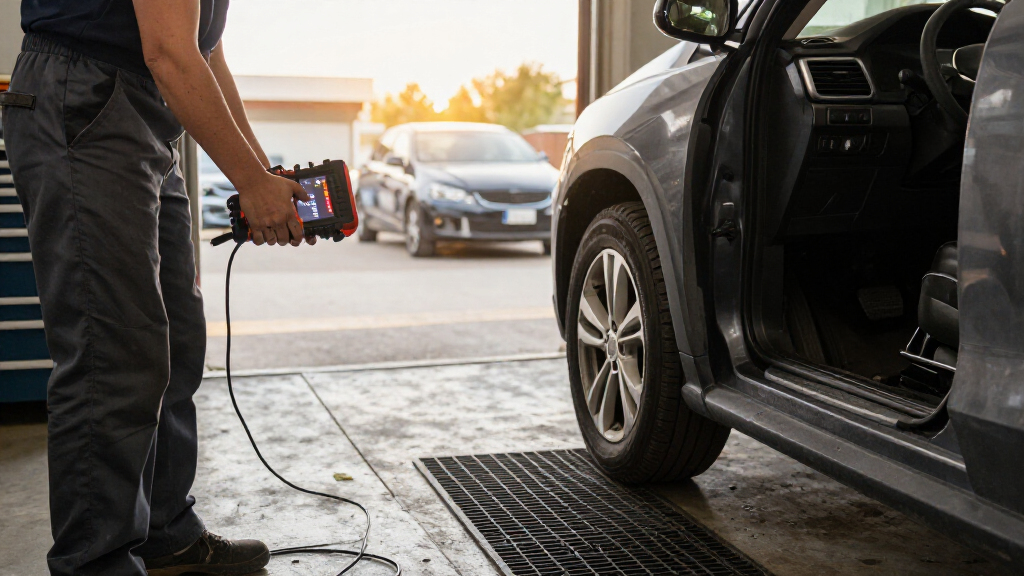
How We Picked
I compared these automotive diagnostic scan tools by the problems they can help solve, not by feature counts alone. The main criteria were vehicle-system coverage, access to live data, bidirectional test capability, service functions, interface and connection style, and how approachable each tool appears for its intended user. I also considered whether a scanner’s strengths match a clear buyer need, such as basic check-engine diagnosis, targeted ABS and SRS access, or broader workshop-level troubleshooting.
The ranking favors tools that combine useful coverage with practical diagnostic depth for a wider range of owners. The Autel MaxiCOM MK808S takes the lead for its mix of full-system diagnosis and active tests; the larger-screen TOPDON and advanced Autel and THINKCAR options suit buyers who want more capability. Simpler code readers rank lower because they serve narrower jobs, not because they are poor fits for those jobs. Since functions can vary by vehicle, model year, and software support, I treat advertised capabilities as features to verify against the specific car.
Factors to Consider When Choosing Automotive Diagnostic Scan Tools
The right scanner depends on what you want to diagnose and how often you will use it. I would start with the vehicle and repair tasks, then weigh diagnostic depth against setup, learning curve, and ongoing support.
Match System Coverage to Your Repair Goals
A scanner that reads engine codes may be enough if your only goal is investigating a check-engine light. For ABS, airbag, transmission, or other module faults, verify that the tool supports those systems for your exact vehicle. A common mistake is assuming that the phrase “full-system” guarantees every module on every make and year. Check the manufacturer’s coverage information before buying, especially for less common models or newer vehicles. Broader access can save time when one warning light has several possible causes, but it may add menus and functions you never use. Choose by the systems you expect to troubleshoot rather than by the longest feature list.
Know What Bidirectional Tests Actually Add
Basic scanners report codes and data; bidirectional tools can send commands to supported vehicle components. That can help isolate whether a component responds, but it does not prove that the component is healthy or replace a repair procedure. Active tests may also be limited by vehicle make, model, year, and the specific module. Before paying for bidirectional capability, identify a few tests you are likely to run and check that they are supported. Home mechanics who only want to read and clear engine codes may get little benefit from this feature. For frequent troubleshooting or repair work, it can make diagnosis more direct.
Separate Reset Services From Diagnostic Coverage
Oil, brake, battery, and other reset functions are useful after maintenance, but a long service list does not mean the scanner can diagnose every system. Some resets require a supported vehicle, a completed repair, or a particular sequence of steps. Buyers can overpay by focusing on the number of service functions without checking whether their vehicle supports the ones they need. Make a short list of recurring maintenance tasks and verify coverage for each one. If you mainly need occasional code reading, service menus may be secondary. If you maintain several vehicles, broader service coverage can justify a more capable tool.
Choose an Interface You Will Actually Use
A simple handheld reader can be easier to keep in a glove box and faster to use for a quick check. Larger touchscreens can make live data and multi-step diagnostics easier to view, but they take more storage space and may involve a steeper learning curve. Wireless connections can reduce cable clutter, yet add setup and device-management steps compared with a direct-wired tool. Consider where you will work: a driveway, a shared garage, or a shop with limited space can change which form factor feels practical. Do not treat screen size or wireless operation as a measure of diagnostic accuracy. Pick the interface that suits your routine and comfort level.
Check Vehicle Compatibility Before Comparing Extras
Compatibility is not a single yes-or-no claim: a scanner may read standard engine codes on a vehicle but lack access to its manufacturer-specific modules or special functions. Confirm the exact make, model, year, and desired operation before choosing a tool. This matters particularly for bidirectional tests, reset procedures, and newer or less common vehicles. Another common error is assuming that “universal OBD-II” means universal access to all vehicle electronics. If you work on multiple makes, prioritize verified coverage across those vehicles over a feature that applies to only one. Keep the intended task in mind when checking support details.
Balance Diagnostic Depth With Learning Curve
Advanced scan tools expose more data and controls, but that can make it harder to find a basic answer if you are unfamiliar with diagnostic terms. New users may benefit more from clear live-data displays and straightforward code descriptions than from a deep menu of tests. A professional or experienced DIYer may prefer access to more modules and active commands, even if the interface takes longer to learn. Think about whether the scanner will be used for occasional warning lights or as part of regular repair work. The best fit is not necessarily the most capable model; it is the one whose features you can use safely and often. When uncertain, prioritize verified coverage and clear operation over extra functions.
Frequently Asked Questions
Will these scanners work with every car that has an OBD-II port?
Most OBD-II scanners can perform basic diagnostics on many compatible vehicles, but that does not mean every feature works on every car. Manufacturer-specific systems, active tests, and service resets can depend on make, model, year, and module. Check compatibility for the exact task you want to perform, not only whether the vehicle has an OBD-II port. This distinction matters most when comparing basic code readers with full-system tools. If you own several vehicles, confirm coverage for each one before choosing.
Do I need bidirectional control for home repairs?
Not necessarily. Bidirectional control is most useful when you need to command a supported component as part of troubleshooting, rather than only read codes and live data. For occasional check-engine-light diagnosis, a simpler scanner may be enough. If you regularly repair vehicles or need to test how components respond, a bidirectional model can offer more diagnostic options. Check that the active tests you need are supported on your vehicle, since the feature does not provide identical access across all makes.
Is a scanner with more reset functions always the better choice?
No. Reset functions matter only when they match your vehicle and the maintenance you perform, and they do not indicate how well a scanner diagnoses faults. A tool may list many service operations but support only some of them on your car. Compare the specific functions you need, such as a relevant maintenance reset, against confirmed vehicle coverage. If your main need is identifying an engine fault, system access and useful data may matter more than a long reset menu. Choose based on your repair routine, not the count alone.
Should I choose a basic code reader or a full-system scanner?
Choose a basic reader if you mainly want to check engine codes, view standard data, and keep a compact tool available for occasional use. A full-system scanner makes more sense if you need access to systems such as ABS, SRS, or transmission modules, or expect to use service functions and active tests. The additional capability can bring a more involved interface and features that a casual owner may never use. Consider the kinds of warning lights you need to investigate and whether you do your own repairs. When your needs are narrow, simpler can be the more practical choice.
What should I verify before buying a scanner for a newer or less common vehicle?
Confirm support for the exact make, model, and year, then check the specific modules and operations you plan to use. Do not rely only on broad claims such as universal compatibility or full-system diagnosis. Newer vehicles and less common makes may have different access to manufacturer-specific functions, even when standard OBD-II code reading is available. If you need an active test or reset, ask whether that operation is supported for your vehicle rather than assuming it is included. This check can prevent buying a capable scanner that lacks the one function you need.
Conclusion
For one scanner that balances broad coverage and active testing, I recommend the Autel MaxiCOM MK808S as best overall. The FOXWELL NT301 is my best value for straightforward check-engine work, while the Autel MaxiCOM MK900BT is my best premium direction for buyers seeking a more advanced diagnostic tool. Beginners who want a simple entry point should look at the ANCEL AD310; it is less capable than the full-system options but better suited to basic code checks. For a focused need, the FOXWELL NT604 Elite is a practical pick for ABS, SRS, and transmission access. Before deciding, verify that the scanner supports your vehicle and the exact functions you plan to use.


