If your Milwaukee power tool charger keeps blinking red, it can be frustrating and hinder your work. This blinking indicator often signals a problem with the battery, charger, or connection. Fortunately, many issues are fixable with some basic troubleshooting steps. In this guide, you’ll learn how to identify the cause of the blinking red light and how to resolve it safely, ensuring your tools are ready to go when you need them.

Get garage and car supplies delivered free — and shop member deals
- Fast, free delivery on millions of items
- Access to Prime Big Deal Days deals on October 6–7
- Prime Video, Amazon Music and more included
Before starting, ensure you have your charger, batteries, and user manual handy. Always prioritize safety and disconnect power sources before performing any fixes.
Key Takeaways
| Understanding the blinking red light | It indicates a charging issue, often related to battery health or connection. |
| Basic troubleshooting steps | Check connections, clean contacts, and test batteries to identify the problem. |
| Battery considerations | Battery age, temperature, and health can affect charging performance. |
| When to seek professional help | Persistent issues despite troubleshooting may require expert service. |
Identify the Cause of the Red Blinking Light
The first step is to determine why the charger blinks red. Usually, a blinking red light indicates that the charger detects a problem with the battery or the charging process. Common causes include a faulty battery, poor contact between the battery and charger, or environmental factors like temperature.
Start by inspecting the battery and charger for visible damage or dirt. Refer to your Milwaukee charger’s user manual for specific indicator codes, but a blinking red typically signals a problem to be addressed before charging can resume effectively.
Check and Clean Battery Contacts
- Unplug the charger from power and remove the battery.
- Inspect the battery terminals and the charger contacts for dirt, debris, or corrosion.
- Clean the contacts gently with a dry cloth or a soft brush to ensure good electrical connection.
- Reinstall the battery firmly into the charger.
- Plug in the charger and observe the indicator.
Cleaning contacts can resolve poor connections that cause blinking lights. Always handle batteries carefully and avoid using liquids unless specifically advised by Milwaukee instructions.
Test with a Known Good Battery
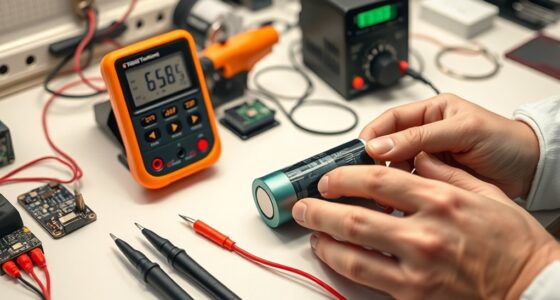
If cleaning contacts doesn’t resolve the issue, try testing with a different, fully charged battery. Use a battery that you know is in good condition, ideally one that has recently been charged on a different charger or has a full charge.
If the new battery charges without blinking, the original battery may be faulty or degraded. If the blinking persists with a good battery, the issue may lie with the charger itself or environmental factors.
Check the Battery’s Temperature and State of Charge
Milwaukee batteries and chargers are sensitive to temperature. Ensure the battery is within the recommended temperature range (usually between 32°F/0°C and 104°F/40°C) before charging. If the battery is too cold or hot, the charger may blink red to prevent damage.
Allow the battery to reach room temperature before attempting to charge again. Also, verify that the battery has sufficient charge; a deeply discharged or over-discharged battery might cause charging issues.
Replace Faulty Batteries or Charger
If all previous steps fail, the battery might be beyond repair or the charger may be malfunctioning. Consider replacing the battery with a new one, especially if it’s old or shows signs of damage. Milwaukee offers high-capacity batteries like the 5.0 Ah XC or the 6.0 Ah High Output XC, which provide reliable power and longer runtime.
If a new battery doesn’t resolve the blinking red light, test with a different charger if available. Persistent issues may require professional repair or replacement from Milwaukee customer service.
The Products in This Guide

Milwaukee M18 18V Cordless Power Tool Combo Kit
- ✔ Power System: M18 18V lithium-ion
- ✔ Battery Capacity: 3 batteries included
- ✔ Tools Count: 8 tools

Milwaukee Shockwave 100pcs Impact Driver Bit Set Packout
- ✔ Color: Red and black
- ✔ Material: Steel
- ✔ Box Size: Packout case
Milwaukee M18 18V Cordless Power Tool Combo Kit
The Milwaukee M18 18V Cordless Power Tool Combo Kit offers a comprehensive solution for construction, remodeling, and maintenance tasks. With eight tools, three batteries, and a rapid charger, it’s designed for durability and extended performance. The charger’s blinking red light typically indicates a charging or connection issue, but with proper troubleshooting, most problems can be resolved quickly.
Pros:
- Complete 8-tool set for versatile use
- Includes 3 batteries for longer runtime
- Rapid charger minimizes downtime
- Durable construction for tough jobs
Cons:
- Charger blinking red can be confusing
- Battery aging may cause charging issues
- Requires proper maintenance for longevity
Best for: Professional contractors and serious DIYers needing a complete kit
Not ideal for: Casual users or those with only occasional needs
Bottom line: A comprehensive and durable power tool kit, with troubleshooting for charging issues included.
Milwaukee Shockwave 100pcs Impact Driver Bit Set Packout
The Milwaukee Shockwave 100pcs Impact Driver Bit Set Packout is a must-have addition for any toolbox. It offers a wide range of bits designed to withstand heavy-duty use, ensuring your impact driver can handle various materials and fasteners. This set is especially useful when troubleshooting charging issues, as having reliable bits makes maintenance and adjustments easier.
Pros:
- 100-piece impact driver set
- Durable Shockwave bits
- Includes a Packout case
- Versatile for many applications
Cons:
- Bulkier case for storage
- Some bits may be redundant for casual users
- Not a standalone charger fix
Best for: Professional tradesmen and serious DIYers
Not ideal for: Casual hobbyists or light users
Bottom line: A comprehensive set of impact bits perfect for demanding tasks and maintenance.
Frequently Asked Questions
What does a blinking red light on my Milwaukee charger mean?
A blinking red light typically indicates a charging issue, such as a problem with the battery, poor contact, or environmental factors affecting charging performance.
How do I clean the battery contacts?
Unplug the charger, remove the battery, and gently clean the terminals and contacts with a dry cloth or soft brush to remove dirt or corrosion. Reassemble and test again.
Can I use a different battery to troubleshoot?
Yes, testing with a known good, fully charged battery can help determine if the issue is with the battery or the charger.
What temperature should I charge my Milwaukee batteries?
Charge batteries within the recommended temperature range, typically between 32°F/0°C and 104°F/40°C, to prevent blinking red issues caused by cold or hot batteries.
When should I replace my Milwaukee battery?
If your battery shows signs of damage, excessive aging, or fails to hold a charge despite troubleshooting, it may be time to replace it with a new Milwaukee battery.
Getting Your Milwaukee Power Tools Back in Action
Dealing with a blinking red light on your Milwaukee charger can be straightforward with a systematic approach. By inspecting contacts, testing batteries, and considering environmental factors, you can often resolve the issue yourself, saving time and money. Remember, always prioritize safety and use genuine Milwaukee batteries and chargers for the best results. If problems persist, reaching out to Milwaukee’s customer service or seeking professional repair is advisable. With proper care and troubleshooting, your power tools will be ready to tackle your next project.
Affiliate disclosure: As an Amazon Associate we earn from qualifying purchases. Prices and availability are accurate as of the time of publishing.
Halloween Picks
halloween
As an affiliate, we earn on qualifying purchases.