
TL;DR

Get business pricing on garage and car supplies
- Business-only prices and quantity discounts
- Tax-exempt purchasing
- Multiple users, one account, clear invoices
Building an AI workstation used to be cheaper, but today prebuilt systems often match or beat DIY prices due to supply chain issues. The decision now depends more on time, control, and support than just component costs.
Imagine you’re staring at a mountain of GPU parts, wondering if it’s worth the hours to assemble your own AI powerhouse. Or maybe you’re pressed for time, eager to start training your models tomorrow, not next month. The question isn’t just about parts anymore — it’s about what you value more: control or convenience.
As AI workloads grow more complex, the decision to build or buy a workstation has shifted from a simple cost comparison to a nuanced choice involving time, reliability, support, and workflow fit. In 2026, the landscape has changed so much that prebuilts can sometimes match or even beat DIY prices. So, what should you really consider before pulling out your screwdriver or clicking ‘Add to Cart’?
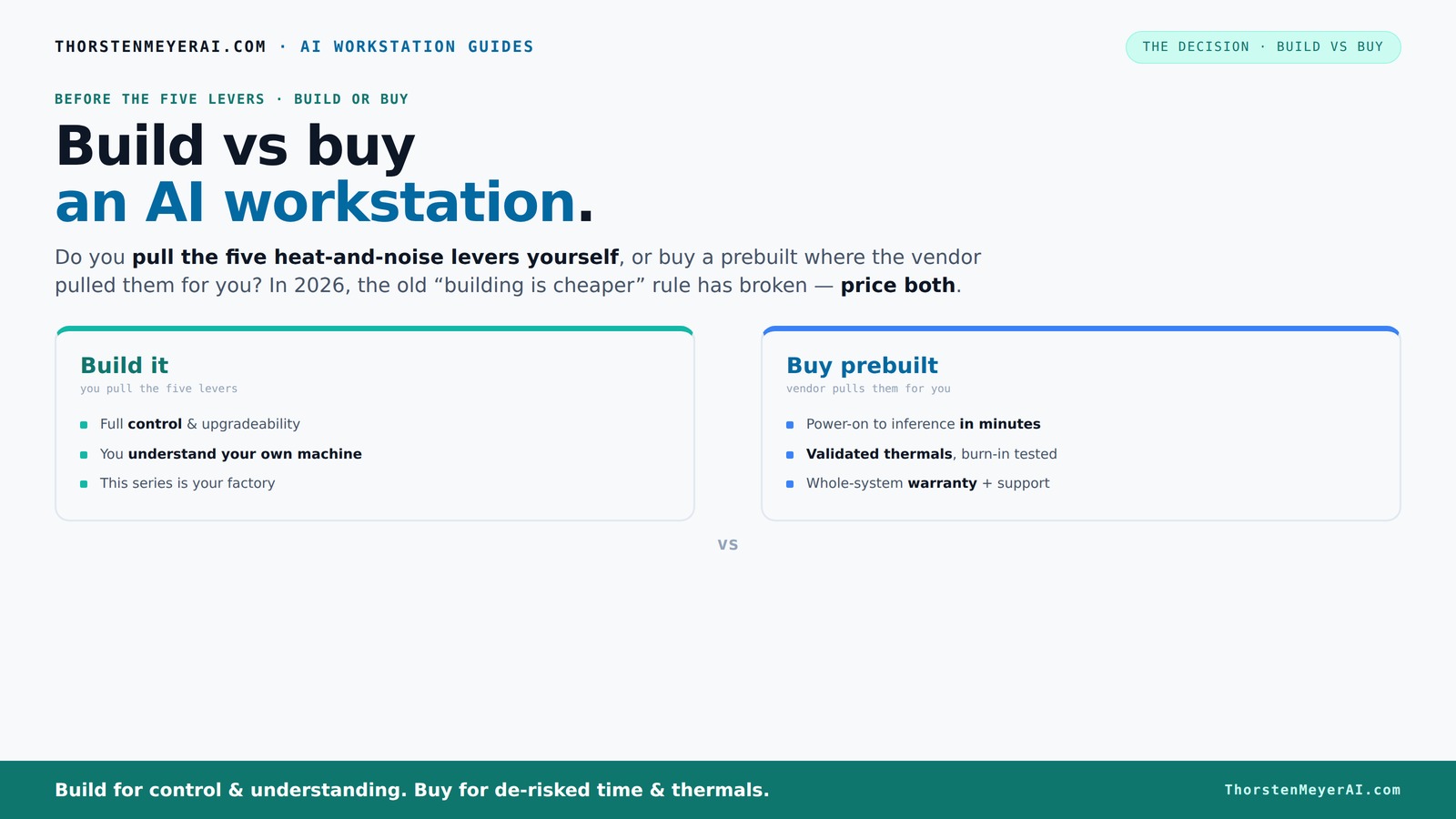
Build vs buy
an AI workstation.
The real question behind this whole series: do you pull the five heat-and-noise levers yourself, or buy a prebuilt where the vendor pulled them for you? And in 2026, the old “building is cheaper” rule has broken. Match your situation in Part 3.
Key Takeaways
- Component shortages in 2026 mean prebuilts often match or beat DIY prices for high-end AI workstations.
- Prebuilts save time and reduce troubleshooting, especially for multi-GPU setups and thermal tuning.
- Building your own system offers maximum control, upgradeability, and cost savings on parts, but requires expertise and time.
- Support and warranty are significant advantages of prebuilt systems, minimizing downtime during failures.
- The decision depends more on workflow needs and control preference than just GPU specs or initial cost.
As an affiliate, we earn on qualifying purchases.
Why Building Your Own AI Workstation Isn’t Cheaper Anymore
Building your own AI rig used to be the clear money-saver. But today, component shortages and bulk buying have flipped that script. A DIY build with high-end parts like DDR5 RAM, RTX 4090 GPUs, and fast NVMe SSDs now costs around $1,250 or more, often more than a prebuilt with similar specs.
For example, a top-tier prebuilt from Lambda or BIZON can be priced just slightly above, or even below, what it takes to source those parts individually. This is due to vendors buying in bulk long before prices spiked, allowing them to offer competitive systems with validated thermal and power configurations. The older rule — build cheaper, buy faster — no longer holds in 2026.
More importantly, this shift affects your decision-making because it challenges the assumption that DIY always offers a better price. Now, you need to consider what you’re sacrificing—such as support, validated stability, and time—when choosing to build. The cost savings are no longer just about parts but also about the potential hidden costs of troubleshooting, compatibility issues, and the time spent tuning your system for peak performance. These tradeoffs can make DIY less attractive if your priority is a reliable, ready-to-go machine.
The Five Levers of a High-Performance AI Workstation—and Who Pulls Them
Managing heat and noise in a high-power AI system isn’t just about choosing the right parts. It’s about tuning five key levers: undervolting the GPU, matching the cooler, optimizing airflow, setting fan curves, and positioning the machine for best cooling.
Buy a prebuilt → the vendor pulls these levers, validating thermals and noise levels through extensive testing, often using water cooling and custom fans for quiet operation. This process ensures the system runs efficiently under load, reducing the risk of thermal throttling and noise disruptions that can hamper your productivity or training accuracy. It’s a form of quality assurance that saves you from the trial-and-error of tuning your own system, which can be time-consuming and require expertise.
Build it yourself → you control every detail, from selecting a quiet GPU like the RTX 4080 with low VRAM to choosing a case with sound-dampening panels. This gives you maximum control and the ability to fine-tune every aspect, but it requires knowledge of thermal dynamics and airflow management. The tradeoff is that achieving optimal acoustics and thermal performance involves iterative testing, which can be a lengthy process. The benefit is a system tailored precisely to your environment—if you’re willing to invest the time and effort.
Understanding who manages these thermal and acoustic factors is crucial because it impacts not only noise levels and longevity but also the consistency of your AI workloads. Proper management prevents overheating, reduces hardware stress, and ensures stable performance—key considerations when choosing between a prebuilt and a DIY system.
When Buying a Prebuilt Makes Your Life Easier
If your time is worth more than saving a few dollars, a prebuilt is a clear winner. It arrives ready to deploy, with the OS, drivers, and AI software stack pre-installed. You can power it on and start training models or running inference within minutes, saving you from the complex setup process that can take days or even weeks with a DIY build.
For example, a machine from Puget Systems is tested for 24–48 hours under load, ensuring it won’t throttle during long AI sessions. This rigorous testing ensures the system maintains stable performance over extended periods, which is critical for large-scale training or continuous inference. Additionally, prebuilt systems come with a warranty, so if something breaks or underperforms, you call support instead of troubleshooting hardware issues yourself. This support can be invaluable when your project timeline depends on system reliability and uptime.
For busy professionals or teams, this setup means less downtime and more focus on your actual work—whether that’s developing models, running experiments, or deploying AI solutions—rather than spending valuable time diagnosing hardware conflicts or BIOS issues. The convenience and peace of mind can outweigh the initial cost premium, especially when reliability is non-negotiable.
When Building Your Own System Is Still the Better Move
If you crave maximum control, or plan to upgrade frequently, building your own rig might be the better choice. You pick every component — from the CPU to the cooling — ensuring it’s tailored perfectly to your workload. This level of customization allows you to optimize for specific tasks, whether that’s maximizing GPU VRAM for large models or selecting a CPU with higher core counts for data preprocessing.
For example, a researcher working on a specific AI model might choose a motherboard with extra PCIe slots, a high-quality power supply, and a custom cooling loop. This approach not only ensures the system is tailored to current needs but also simplifies future upgrades by selecting standard, accessible parts. The ability to upgrade specific components over time can extend the lifespan of your workstation and adapt to evolving project requirements.
Furthermore, DIY affords you the opportunity to fine-tune your system for workflows that demand specialized configurations, such as embedding a quiet GPU for inference tasks or integrating additional storage for large datasets. While this approach demands more effort upfront, it can lead to better performance and lower costs in the long run if you’re comfortable with the technical work involved.
The Key Factors in Your Decision: Price, Time, Support, and Workflow
| Factor | Build Your Own | Buy Prebuilt |
|---|---|---|
| Cost | Lower parts cost, but hidden costs in troubleshooting and time. You may save money on components, but the time spent diagnosing compatibility issues, tuning, and fixing problems can add up. Additionally, if you make mistakes, you might need to replace parts, increasing overall expense. | Higher upfront, but includes validation, support, and warranty. While the initial price might be higher, the peace of mind, guaranteed stability, and reduced downtime often offset this cost, especially for mission-critical workloads. |
| Time to Ready | Days to weeks, depending on experience and availability of parts. The process involves sourcing, assembly, and extensive testing, which can delay project timelines if you encounter issues. | Same day or next day in many cases. Prebuilts are assembled, tested, and ready to deploy, allowing you to start your work immediately and avoid delays caused by hardware setup. |
| Support & Warranty | Self-supported; no manufacturer warranty. You are responsible for troubleshooting hardware issues, which can take time and require expertise. | Vendor support with warranty coverage. This reduces the risk of prolonged downtime, as professional support can quickly resolve problems, keeping your project on schedule. |
| Upgradeability | Easy, with open standards and accessible parts. You can replace or add components over time, adapting your system to new requirements or technologies without much hassle. | Varies; some proprietary parts may limit upgrades. You must verify compatibility and support policies, as some prebuilts use custom components that restrict future enhancements. |
| Workflow Fit | High — tailor every component to your needs, ensuring optimal performance for specific AI tasks and data workflows. | Good — validated, optimized by vendor, but less flexible for highly specialized or evolving workflows. |
The choice depends on whether you prioritize control and upgradeability or speed and support. Both paths have tradeoffs that can significantly impact your project timelines and long-term costs. Consider your technical skill, project scope, and future plans when making this decision.
Who Should Build? Who Should Buy?
Think of your own situation. Are you a hobbyist, student, or small team with time and technical skill? Building might be your best bet. You’ll save money, learn more, and get exactly what you want with full upgrade paths. This approach is ideal if you enjoy tinkering, have the patience for troubleshooting, and want a system precisely tailored to your current and future needs.
Are you a busy professional, company, or enterprise? Prebuilt systems offer peace of mind, quick deployment, and vendor-backed support. They are designed for reliability and minimal fuss, especially when AI work is mission-critical. For organizations needing rapid scaling or minimal downtime, prebuilts reduce the risk of hardware incompatibilities and setup errors, ensuring your workflows stay uninterrupted.
For example, a solo data scientist might prefer building a custom system tuned for specific models and workflows, while a startup aiming for quick deployment and scalability would lean toward a prebuilt from Lambda or BIZON. Your choice depends on your technical comfort level, project urgency, and long-term growth plans.
The Hidden Costs and Traps You Should Watch Out For
Building your own system can hide costs in troubleshooting, component compatibility, and time spent tuning. An underpowered PSU or incompatible RAM can cause headaches and delays, which may extend your project timeline and inflate costs beyond initial estimates. When parts don’t work well together, you might spend days diagnosing issues that could have been avoided with validated configurations.
Prebuilts might include lower-quality components in less-visible areas, like power supplies or motherboards, so check the specs carefully. Sometimes, you pay a premium for convenience, but get less than you expect if the parts are not well-chosen or tested. Price traps exist on both sides—an expensive GPU doesn’t guarantee overall system quality, and cheaper components may compromise stability.
Always compare detailed specs, read reviews, and consider the long-term implications of your choices. Recognize that hidden costs—such as time lost troubleshooting or replacing incompatible parts—can outweigh initial savings. Being aware of these pitfalls helps ensure your investment yields the performance and reliability you need for demanding AI workloads.
Frequently Asked Questions
Is a prebuilt AI workstation worth the extra cost?
If your priority is quick setup, reliable thermal management, and vendor support, then yes. Prebuilts save time and reduce troubleshooting, making them a wise choice for most professionals in a hurry.Is it cheaper to build or buy an AI workstation today?
Due to component shortages and bulk buying, prebuilts often match or beat DIY costs in 2026. Always compare specific configurations, as the answer depends on current market prices and your customization needs.Will a prebuilt perform as well as a custom build?
Yes, if you choose a reputable vendor that validates thermals and power delivery. Many prebuilt systems are optimized for AI workloads and tested for long-term stability, often surpassing DIY in reliability.Which parts matter most for AI workloads: GPU, RAM, CPU, or storage?
GPU VRAM and compute cores are critical for large models and inference speed. However, fast RAM and SSDs also impact data handling and overall responsiveness. Prioritize GPU, but don’t neglect the rest.Can I upgrade a prebuilt system later?
It depends. Many prebuilts use proprietary parts, making upgrades trickier. Check the support and upgrade policies before buying, especially if future expansion matters to you.Conclusion
Building or buying a high-end AI workstation isn’t just a matter of dollars anymore. It’s about what you want to get from your machine — control, speed, reliability, or all three. The right choice depends on your workflow, your skills, and how much time you’re willing to invest.
If you’re racing against deadlines or prefer peace of mind, a prebuilt might be your best move. But if you love fine-tuning, upgrading, and squeezing every ounce of performance, building remains a rewarding challenge. Either way, remember: in 2026, the best machine is the one that fits your needs, not just your budget.
Halloween Picks
halloween
As an affiliate, we earn on qualifying purchases.